Introduction
The AV.Park solution consists of many components that are interrelated. Important terms such as parking subscribtion, tariff, zone, parker, zone transit time, device and customer are basic terms to understand how AV.Park works.
The customer is the one who determines zones, tariffs, parking subscriptions and parkers and deposits them in the system respectively.
Zone:
The term "zone" defines and delimits a geographical area to be used as a parking zone. A large parking zone (such as a multi-storey car park, also called a "grouping element") can be subdivided into sub-parking zones (for example, floors of the car park) as needed to reflect the physical reality of the car park. But also single-level parking fields can be subdivided into different zones. This may be necessary if certain zones are intended only for employees, so-called "parkers". Third-party parkers (i.e. visitors from out of town) can thus be prohibited from parking in this employee zone.
Devices:
The different zones can also be separated by devices such as barriers, bollards and garage doors, etc. These devices obtain information in the background when a car "arrives" as to whether the person has parking permission in this zone. These devices also distinguish between parker and third-party parker.
For parker, the arrival and departure times can be automatically logged (using UHF tags, NFC badges, QR codes or number plate recognition). The transit time defined by the customer (the maximum time a parker may stay in the zone before having to pay the tariff) can thus also be implemented quite easily. A special feature of the use of such devices is that the parking fees incurred by employees are automatically stored in the system and can also be included in the company-specific payroll accounting without any further work.
For third-party parker on the other hand, there is no automatic recognition via QR code or UHF tag and the visitor has to "register" himself in the app or a car number recognition is used. The system is designed in such a way that the third-party parker can automatically view the rates for the corresponding zone via the app and choose the most suitable one. He has to enter his vehicle registration number, personal details and credit card in the app. The parking fee is only debited upon confirmation by the visitor and not automatically as in the case with parker.
Parking subscribtions:
Special parking subscribtions can be defined for parker (employees) so that they are allowed to park at certain times under certain conditions.
Parking subscribtion can include many different tariffs (e.g. fixed price, linear price, tiered price) (see chapter 2.1.3). However, a tariff can only ever be based on one parking subscribtion.
Device configurations / Device Tariff:
If access is required for employees or other persons (such as the fire brigade, paramedics etc.) so that they have free access to control the various devices (barriers, bollards, etc.) a so-called "device tariff" or "device configuration" can be created. People are assigned to these tariffs and this assignment can then be use4d to access the various devices via the AV.Park app in order to control them. The tariff can in turn be assigned to a "normal" and alreaqdy existing configuration. Or you can create your own device configuration to assign the corresponding device tariffs to people. It should be noted that the device tariffs only have two price options:
•Free: You can use the parking facility at no additional cost despite the device (barrier etc.) or generally control the device free of charge (bollards)
•Fixed price: A fixed price is charged for each use/access of the device
A simple example to illustrate (see figure 2):
A client has a car park (grouping element) with two levels and one outside parking space. Accordingly, he has divided the three parking levels into three zones. For the employees (parker) there is a special parking subscription, which is based on a specific tariff. Level 2 (Zone 2) in the multi-story car park is reserved for employees and separated by a barrier, where you are only let through with the appropriate permission (by automatic recognition through tags, badges, number plate or QR code). The fees for parking can be found in the payroll.
Level 1 (zone 1) and the outdoor car park (zone 3) are also accessible to visitors (third-party parker). In these zones, the parking subscriptions for visitors is active (several subscriptions can also be made available). This subscriptions uses two different tariffs, one for zone 1 and one for zone 3. Depending on where you are parked, the corresponding parking configuration is automatically displayed in the app and can be selected. Only then will the visitor be charged.
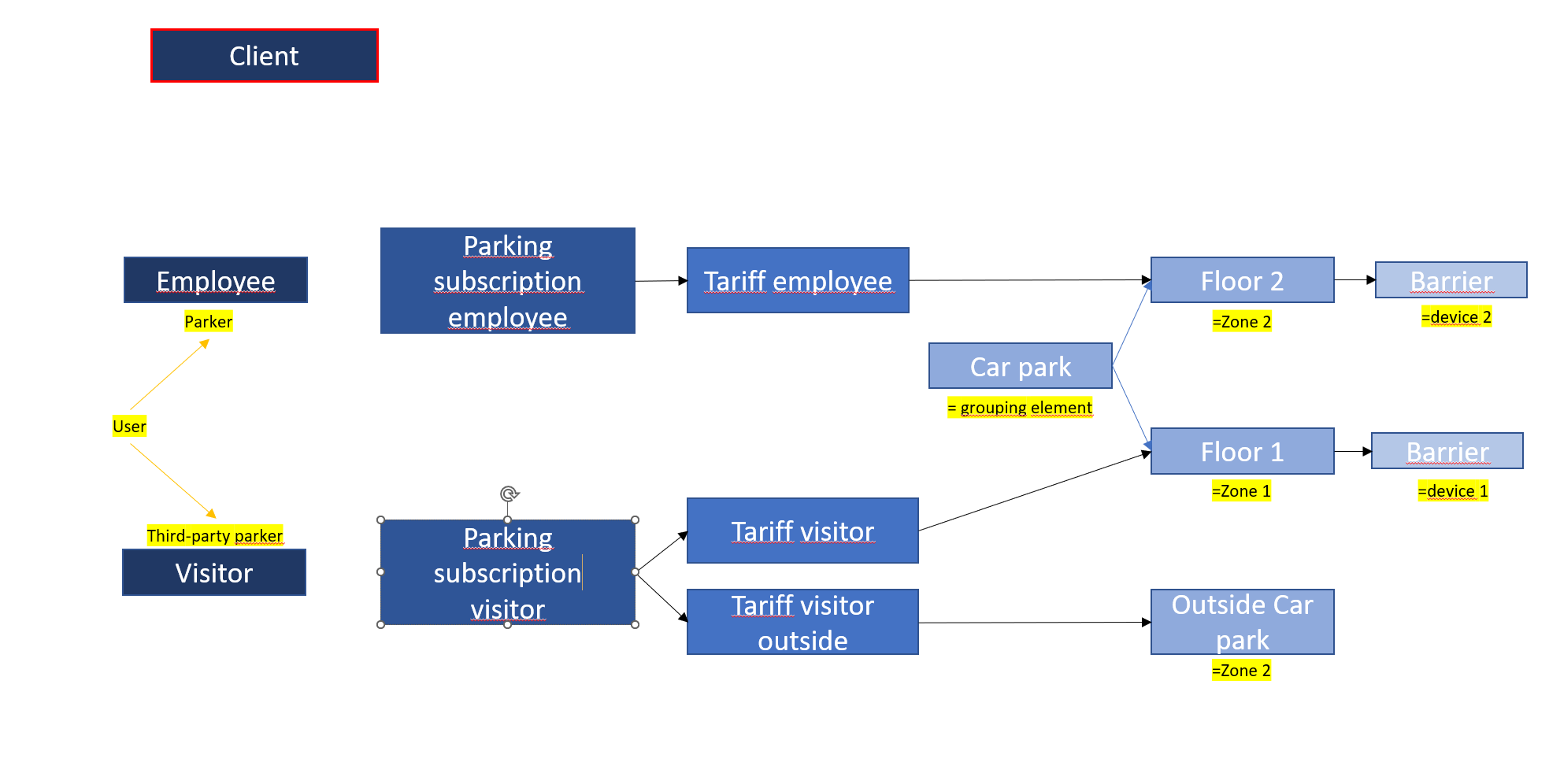
Abbildung 1: Overview elements of the AV.Park solution