Introduction:
The administration and verification of parking attendant rounds is accessible to companies that use the service of a parking attendant for their parking spaces. Each round of each parking attendant with all controlled parkers and third-party parkers is stored in the system and can be viewed.
Example:
Homepage
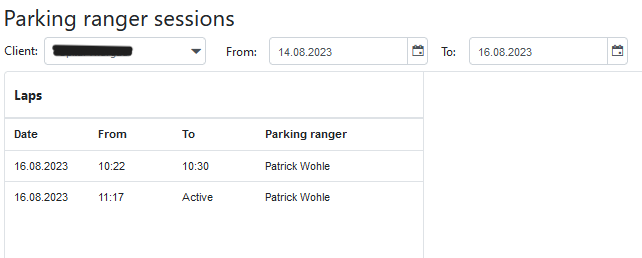
Abbildung 26: Parking ranger sessions homepage
On the start page, the park ranger rounds can be searched and sorted according to individual times. All the rounds that were completed in this time window are listed. The exact start and end times of the rounds can be viewed, along with the name of the park ranger who did the round. If a lap is still active, i.e. it has not yet been completed, "Active" is displayed instead of the time under the item "Until". If you want to see the exact round with the checked vehicles, simply click on the specific parking attendant round and you will get to the list.
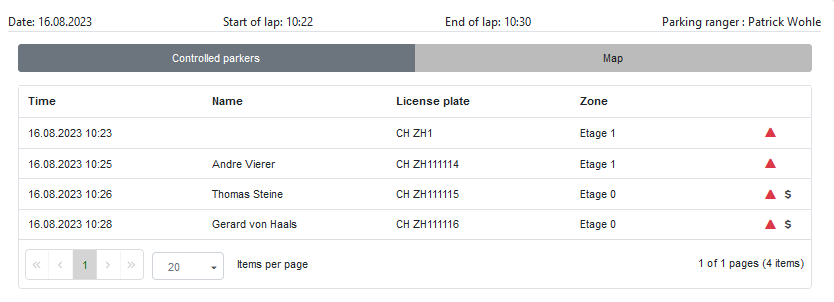
Abbildung 27: List of parking ranger sessions
A detailed list of each individual vehicle now appears in the right-hand window of the page.
The following facts are given:
•The exact time and date when the vehicle was checked.
•The name of the owner of the vehicle if a name has been deposited for a number plate (mostly the case with parkers).
•The number plate.
•Where the vehicle was when it was checked.
•A red triangle indicates that a parker was in the parking space without authorisation and without a valid ticket at the time. If there is no triangle, the vehicle was authorised to be in the parking space at the time it was checked.
•A dollar sign indicates that the vehicle has been fined by the parking attendant for being in the parking space without authorisation. This must be entered manually by the parking attendant in the app.